Windows services that fix themselves at 3 a.m.
Stoker can watch any service on every Windows machine you run and restarts the ones that hang, leak memory, or quietly die, with a circuit breaker so it never makes a bad night worse. Self-hosted, no cloud account, running in five minutes.
Most monitoring wakes you up to do a thing it could have done itself
Nine times out of ten the fix is restart the service. You still get paged, still find the laptop, still connect the VPN, still RDP in, and the outage still lasted forty minutes instead of forty seconds.
The human round trip
Page fires, phone buzzes, VPN connects, RDP opens, service restarts. Every minute of that was avoidable. Stoker closes the loop in one monitoring cycle.
The failure nothing catches
A service pegged at 100% CPU or bloated to 6 GB is still "Running". Windows is happy. Your users aren't. Stoker watches behaviour, not just state.
The certificate you forgot
Nothing paged you because nothing was down, until the cert expired on a Saturday. Stoker warns you weeks out, on the same dashboard.
The invoice that follows
Enterprise monitoring suites bill per host, per month, forever, and still just send an email. Stoker is a flat yearly license and it does the fixing.
Simple pricing. Every feature included.
We don't believe reliability should be a premium feature. The Free edition protects one machine forever. Paid plans only increase how many machines you can monitor, not what Stoker can do. No feature gates. No artificial limitations. Every tier, including Free, gets every update forever, even if a license lapses. Not sure which tier pays for itself fastest? Run your own numbers in the payback calculator above.
Free
Try it on the one box that keeps failing
forever, 1 machine (server, desktop or VM)
- Same automation as every paid tier
- Email & webhook alerts
- Unlimited users
- Uptime & TLS checks
Pro
Small fleets and single-site shops
up to 10 machines, about $1.66 per machine per month
- Up to 10 machines
- Everything in Free
- Email support
- 10x the room to grow, same one dashboard
Business
Growing estates and multiple sites
up to 50 machines, about $0.83 per machine per month
- Up to 50 machines
- Everything in Pro
- Priority email support
- Half the per-machine cost of Pro
MSP
Managed providers, unlimited clients
unlimited machines
- Unlimited machines, no cap ever
- Everything in Business
- Use across client sites
- Priority email support
Secure checkout by Stripe. Your license key will be minted and arrive via email
Two ways out, both easy
Try everything free for 30 days before you pay a penny. Buy anyway and change your mind? Email us and we'll refund it; see the refund policy. Licenses are verified offline, so buying never ties your machines to someone else's cloud.
Everything the on-call rota keeps asking for
A stoker's job is to keep the fire burning, not to admire the smoke. Stoker fixes the common cases itself and only wakes you when a human is genuinely required.
Anywhere Windows runs, not just the server room
A Windows service is a Windows service. If it can hang on a domain controller it can hang on the machine behind the front desk, and that one usually has nobody watching it at all. Stoker treats them the same: one agent, the same rules, the same dashboard.
- Servers domain controllers, file and print, SQL, IIS
- Virtual machines Hyper-V, VMware, cloud instances
- Workstations CAD, lab and trading desks
- Unattended PCs POS, kiosks, signage, front desk
- Branch boxes the machine at the far end of a VPN
- Your own dev box the first one is free, after all
Patch night, and the morning after
Tell Stoker when your estate reboots every Sunday at 3 a.m., the day after Patch
Tuesday, the last Saturday of the month and it goes quiet for exactly those machines,
for exactly that long. Point a window at one box, or at a tag like client:northgate
so a whole site goes quiet together.
Then the part nobody else does. Any tool can go quiet on a schedule. The expensive failure is the opposite one: the server rebooted at 3 a.m., came back at 3:06, and SQL Agent never started , so you find out when the client rings at 8:00 AM. Stoker remembers every service that was running when the window opened and checks them all again when it closes. Anything missing gets one critical alert naming it, while you can still do something about it before the office fills up.
- 03:00 window opens, alerts held, agents stand down
- 03:06 box is back, still quiet, still being watched
- 03:20 "SRV-SQL-01 came back without SQLSERVERAGENT"
- Next morning a report showing what went down, for how long, and what returned
Patch runs never start on time, so the agent takes a one-line command from whatever patching tool you already use, and it works even when the hub itself is being patched.
Automatic remediation
Set a CPU or memory limit per service. Breach it continuously past your threshold, or stop, or hang, and Stoker restarts it. Services that ignore a stop request are killed and relaunched cleanly.
A circuit breaker, so it never flaps
Cooldowns between restarts plus a restarts-per-hour breaker that suspends automation, raises a critical alert and hands over to a human. Auto-restart you can actually trust in production.
Your whole fleet from one screen
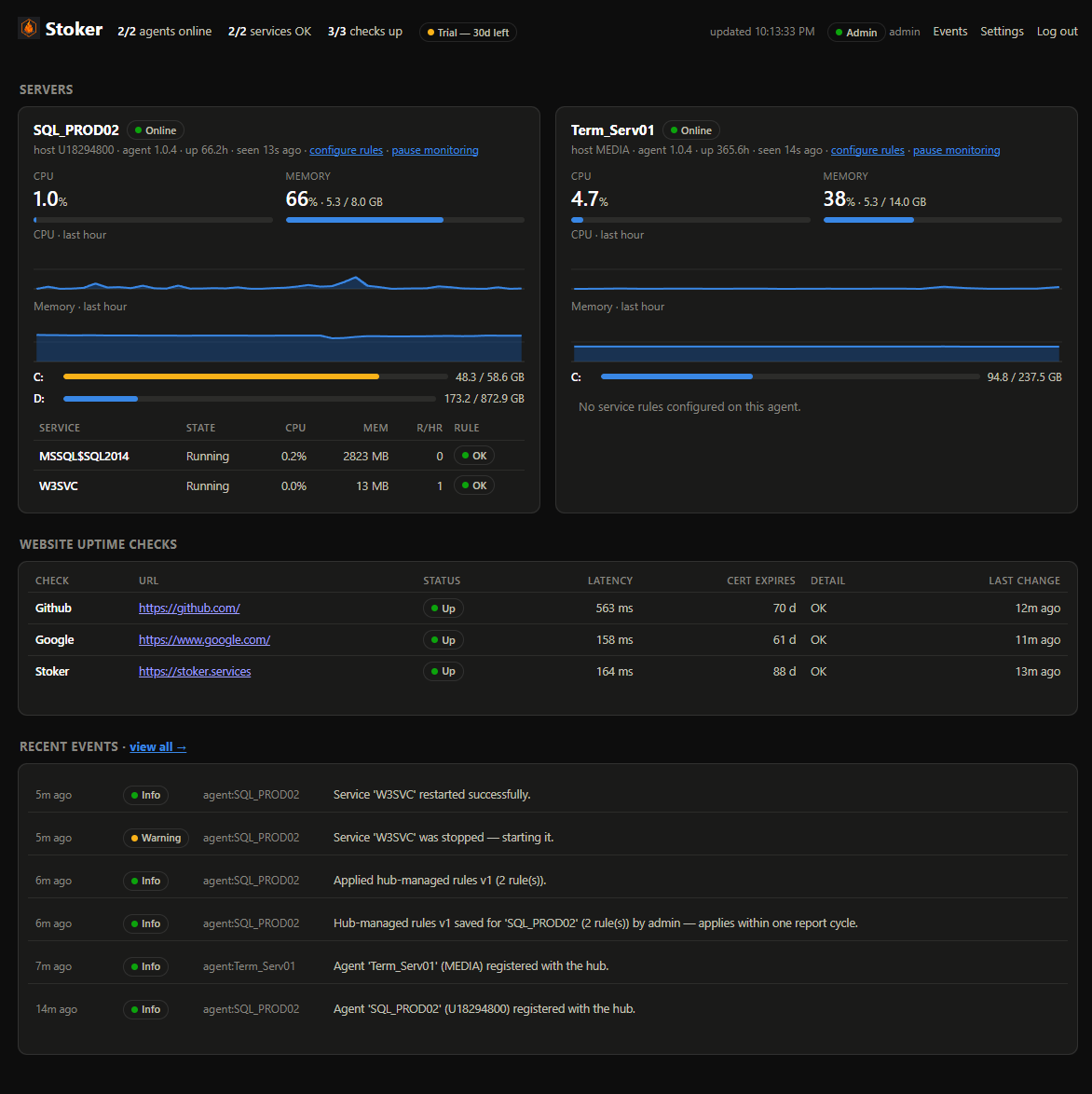
Pick services from a dropdown of what's actually installed on each machine. No name typos, no RDP, no config files. Author a rule set once and apply it to as many machines as you tick, either replacing what they have or merging alongside it. Rules reach agents in seconds and survive reboots even if the hub is down.
Disk space, before it bites
A full disk takes services down in ways a restart cannot fix. Set the thresholds once and every machine is watched against them. Each level pairs a percentage with a free-space figure, so a 50 TB array with a terabyte spare stays quiet while a 100 GB system disk with 4 GB left does not. Reminders back off instead of nagging daily. Same event log, same alert channels.
Uptime & certificate expiry
HTTP checks from the hub with status, keyword and latency validation, plus TLS expiry warnings weeks before the "the certificate expired" call comes in.
Alerts that respect your sleep
Email and webhook (Slack, Discord, Teams-friendly) with a severity floor you set and a quiet window so a flapping service never floods the inbox. Nothing repeats itself at you, and two different problems on one machine never collapse into one notification.
The whole team, right-sized access
Unlimited users, each an admin or read-only. Give on-call, or a wall-mounted NOC screen, a view-only login that sees every machine, check and alert but can't change a thing. No shared passwords, no 2 a.m. accidents.
Self-hosted and dependency-free
One hub executable with an embedded database. Agents only ever dial out to the hub, so monitored machines open no inbound ports and the hub never reaches into them. No cloud account, works fully air-gapped, and your data never leaves your network.
A history you can hand to your boss
Every restart, breach, breaker trip, offline agent and failed check is searchable and filterable by severity, with CSV export and configurable retention.
Watch for smoke signals over the hill, too
The same hub runs HTTP checks against anything with a URL: status code, response keyword and latency, plus TLS certificate expiry, so one dashboard covers "is it running?" and "can customers actually reach it?"
Checks
| Check | Status | Latency | Cert expires | Detail |
|---|---|---|---|---|
| Marketing site | Down | – | 43 d | HTTP 503, expected 200 |
| Customer portal | Up | 122 ms | 5 d | OK |
| Public API | Up | 38 ms | 210 d | OK |
You could write a PowerShell script
And for one machine, you honestly should. Wire up a scheduled task that reruns
Restart-Service on failure and you're covered. The problem starts at machine 20,
or 50, or 200, where scripts stop being a solution and start being a second job. Here is
where each realistic option actually lands.
| Scheduled task or a PowerShell script |
Stoker | Enterprise suite per-host SaaS |
|
|---|---|---|---|
| Restarts a stopped service | Yes | Yes | Usually |
| Catches a hung service still marked "Running" | No | Yes | With scripting |
| CPU / memory thresholds with a breach window | No | Yes | Yes |
| Refuses to restart-loop a crashing service | No | Circuit breaker | Varies |
| Configure 50 machines without touching 50 of them | No | One screen | Yes |
| Searchable event history & CSV export | Event Log spelunking | Built in | Yes |
| Goes quiet on your patching schedule, per client or per box | No | Yes | Usually |
| Tells you what did not come back after the reboot | No | Yes | With scripting |
| Website uptime + TLS expiry in the same place | No | Yes | Yes (add-on) |
| Works with no internet / fully air-gapped | Yes | Yes | Rarely |
| Your telemetry leaves the building | Never | Never | Always |
| Time to a working setup | An afternoon, then upkeep | ~5 minutes | A project |
| Cost for 10 machines | "Free", plus your weekends | $199/year | Often $1,000s/year |
Enterprise-suite column describes the general category, not any one vendor. Pricing and capabilities vary widely, so check your quote against the rows above.
One avoided outage usually pays for the year
Put your own numbers in as see how it can help save your organization.
Assumes Stoker handles the restart in about a minute instead of a human round trip. It won't catch every incident, but it doesn't need to catch many.
Running in five minutes, honestly
No database server, no runtime installs, no YAML. Two small installers and a couple of minutes.
Install the hub
Double-click the hub installer on any Windows box (or unzip and run
install-hub.ps1). Open the dashboard and create your admin password. It's a
Windows service with its own web UI and an embedded database.
Install agents
Generate an agent key in the dashboard, then run the agent installer on each machine you want watched, one by one or pushed silently across your whole fleet by GPO or your RMM tool. Each one appears on the dashboard within about fifteen seconds.
~30 seconds per machinePick your services
Click configure rules on a machine, choose services from the dropdown, set your limits, and Stoker takes it from there, including tonight.
~1 minutePrefer to read first? The full documentation covers hub, agents, rules, HTTPS and troubleshooting end to end.
Coming to the same one dashboard
Every tier gets every update, so what's on the workbench today lands free for Free users too. Nothing here is behind a paywall or a future paywall. Buy in now and the fleet you're watching only gets wider.
Scheduled task watchdog
The backup that quietly stopped running in March. The certificate rotation that has been failing for six weeks. Stoker will watch every Windows scheduled task, alert on non-zero exit codes and missed run windows, and flag tasks that haven't fired in longer than they should. Same event log, same alert channels, no re-run without your explicit say-so.
Linux machines, one fleet
A native Linux agent that reports systemd unit state, CPU and memory to the same hub, next to your Windows boxes. One dashboard, one rules editor, one alert channel across a mixed estate. The hub already runs cross-platform, so this is agent work only.
Docker containers
Watch containers the same way Stoker watches services: alert when one exits or wedges, auto-restart with the same cooldown and circuit-breaker so a crashloop can't flap forever, and surface it in the same fleet view. Works next to the host's own services on the same agent.
Want to nudge one of these up the list, or vote for something not here? Email us We're a small shop, so a human replies, and paying customers get first say on what ships next.
The questions people ask before buying
Straight answers. The rest live on the full FAQ page.
We patch on a schedule. Will it page us every month?
No. Set a maintenance window for when your estate reboots — weekly, monthly, the day after Patch Tuesday — scoped to one machine, one client's tag, or everything. Stoker holds the alerts and tells the agents to stop restarting services while you work. What it does not do is stop watching: when the window closes it checks that every service running beforehand is running again, and raises a critical alert naming anything that is not. You get the quiet night and still hear about the service that failed to come back.
What happens when my license expires?
Nothing stops. Every machine you already monitor keeps being watched, restarted and alerted on. An expired license only blocks registering new machines beyond your tier. We think monitoring that goes dark over a billing hiccup is unforgivable.
Isn't this just a scheduled task with a nicer logo?
A scheduled task can't see a service that's running but hung, can't measure CPU or memory over a breach window, can't stop itself when a service is crash-looping, can't be changed across 50 machines from one screen, and can't tell you what happened last Tuesday. Stoker does all five, and it took five minutes, not an afternoon of scripting you now maintain.
Will it restart a crashing service forever and make things worse?
No. That's what the circuit breaker is for. A cooldown enforces a minimum gap between restarts, and once the restarts-per-hour limit is hit, automation suspends itself, raises a Critical alert and waits for a human. It resumes when the hour window clears.
Do I have to open ports on the machines I'm monitoring?
No. Agents dial out to the hub and pull their rules over that same connection, so monitored machines open no inbound ports and the hub never reaches into them. Only the hub machine listens on one port, and the installer asks before adding that firewall rule.
Does anything phone home? We're in a regulated environment.
No monitoring data leaves your network. Ever. Stoker sends no telemetry, no usage reports, and no diagnostics. License keys are verified offline with embedded public-key cryptography, so the whole product works fully air-gapped.
There is one optional outbound call: an opt-in daily check against a public URL to see whether a newer version has been released. It's off by default, sends nothing about you or your machines when enabled (just asks "what's the current version?"), and can be left off forever. Off = Stoker is completely silent to the outside world.
Do I need the hub, or can an agent run alone?
An agent enforces its own rules on the machine it runs on (watching, restarting, applying the circuit breaker) whether or not a hub is reachable. The hub adds the central half: the dashboard, alerts, uptime and TLS checks, event history and fleet-wide rules. Since the hub is free for your first machine, there's rarely a reason to skip it.
What if the hub goes down?
Agents carry on. The last rules they received are cached locally and survive reboots, so watching and restarting continue uninterrupted; they simply can't report in or receive changes until the hub is back. The protection lives on the box, not in the dashboard.
What do I actually need to run it?
64-bit Windows, Server 2019+ or Windows 10/11, on the hub and each monitored machine. No SQL Server, no .NET install, no container runtime. Everything ships self-contained, and data lives in one SQLite file you can back up by copying it.
Start stoking
Two installers: one hub, one agent. Double-click to install, or push the MSI silently across a fleet. Your first machine is free forever, and every install unlocks a 30-day full trial.